
Automated App Preview Environment
An ephemeral environment-as-code solution for rapid feature validation.Project Overview
This project implements a self-service "Preview Environment" system using GitHub Actions, Docker, and Kubernetes. It enables developers to automatically spin up a fully isolated, production-like environment for every Pull Request (PR), allowing stakeholders to test features in real-time before they are merged into the main branch.
The Problem
Testing Bottlenecks: Manual deployments to a shared "Staging" environment caused collisions between developers.
High Costs: Static environments left running 24/7 wasted cloud resources.
Slow Feedback: QA and Product Managers had to wait for merges to see changes, leading to late-stage bug discoveries.
The Solution
I built an automated pipeline that manages the entire lifecycle of a feature's infrastructure:
Trigger: A developer opens a Pull Request.
Build: A GitHub Self-Hosted Runner builds a Docker image and pushes it to a registry.
Deploy: The runner creates a unique Kubernetes Namespace and deploys the application.
Cleanup: Once the PR is merged or closed, the environment is automatically destroyed to save costs.
Technical Stack
Orchestration: Kubernetes (K8s)
CI/CD: GitHub Actions (with Self-Hosted Runners)
Containerization: Docker
Infrastructure: Kubernetes Namespaces (for isolation)
Automation: Shell Scripting / YAML
Key Features
Dynamic Isolation: Every PR gets its own dedicated namespace, preventing configuration drift.
Automated Cleanup: Event-driven triggers ensure "Namespace Deleted" and "Code Cleanup" occur immediately after PR closure.
Cost Efficiency: Only consumes resources during the active review phase.
Developer Autonomy: Zero manual intervention required from the Ops team to provision environments.
Architecture Workflow
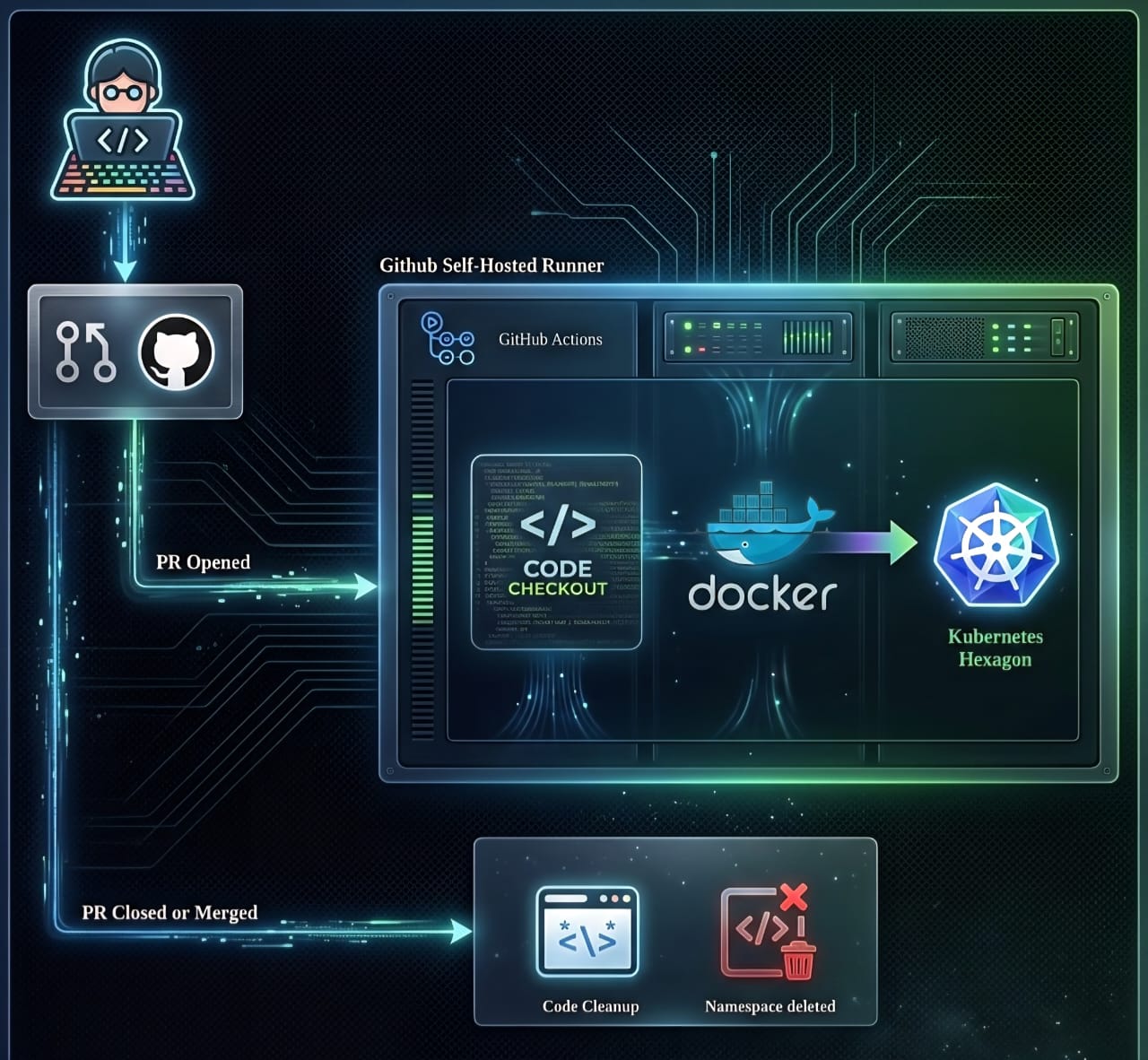
- Developer opens a PR on GitHub.
- GitHub Actions detects the PR Opened event.
- Self-Hosted Runner executes:
- Code Checkout
- Docker Build & Push
- Kubernetes Deployment
- PR Closed/Merged triggers the "Cleanup" job to wipe the environment.
How to Use This
- Fork the repository.
- Configure your GitHub Secrets for Kubeconfig and Docker Registry.
- Open a Pull Request on any branch—watch your preview environment come to life.
Personal Reflection
"Building this project taught me the importance of developer experience (DevEx). By automating the 'Preview' phase, I reduced the feedback loop from hours to under 15 minutes, significantly increasing the team's deployment velocity."


590K
Project Complete